
Company setup: directory, permissions and cost codes
In one sentence: set up the company once (who's who, what each role may do, and how costs are coded) and every new project starts clean.
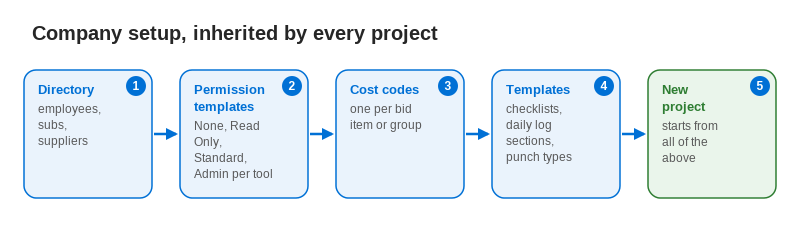
The company directory
Add your employees and the companies you work with: suppliers, subs, the agency's people if they'll be invited. Each person is a contact; each person who logs in is a user with a permissions template.
Permission templates
Procore gives each tool a permission level: None, Read Only, Standard or Admin, with extra granular permissions on some tools. A permissions template bundles those levels for a role, so you assign a role, not 40 settings. Templates can be global (any project) or project specific.
A starting set for a small electrical GC:
| Template | Typical use |
|---|---|
| PM / Project Engineer | Admin on RFIs, Submittals, Change Events, Drawings; Standard elsewhere |
| Superintendent / Foreman | Standard on Daily Log, Photos, Inspections, Punch List, Timesheets; Read Only on Drawings and Specs |
| Accounting | Admin on financial tools; Read Only elsewhere |
| Subcontractor | Read Only on Drawings and Specs; Standard on their RFIs, submittals and punch items |
Be careful with Admin on the Directory tool: Procore's help pages note that it grants Admin on every tool of the project or company.
Cost codes
Procore's financial tools use a work breakdown structure built from codes. On Caltrans unit-price jobs, the most useful structure follows the bid items: one code per item (or per group of items), so budget, costs, change orders and progress billing line up with the RE's estimate.
Templates worth building early
- Inspection checklists (trench, pull box, foundation, pre-energization). See Inspections and observations.
- Daily log sections turned on for your work. See The Daily Log and Caltrans daily reports.
- Punch list types.
PM notes
Keep the first version small. Add a template when someone needs it twice, not before.
In Procore's own help
What are permissions in Procore · Create a project permissions template. Procore's help pages are the reference for how each screen works today.
Common mistakes
- Giving everyone Admin "to make it work".
- Cost codes that don't match the bid items, so billing becomes a translation exercise.
- Building twenty templates before the first project starts.