
Submittals in Procore
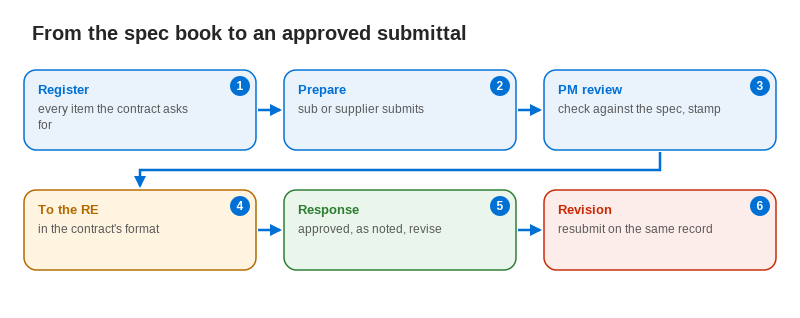
In one sentence: the Submittals tool holds the register (every item the contract asks you to submit) and routes each submittal through a workflow of reviewers, with revisions kept together.
Building the register
- Procore can scan an uploaded spec book and propose a register (its Submittal Builder). On Caltrans jobs, check the result against the Special Provisions and the Standard Specifications sections they invoke: Caltrans books don't follow the building-industry structure the tool expects. See Drawings and specifications in Procore.
- Or import the register from a spreadsheet you already build at the start of the job.
- Group related items in submittal packages (for example all signal equipment).
- Numbering can be prefixed by the spec section.
The workflow
- Submittal manager: owns the submittal.
- Workflow: submitters (often the sub or supplier) and approvers in steps, with due dates.
- Ball in court follows the current step; when the workflow ends it returns to the submittal manager.
- Responses such as approved, approved as noted, revise and resubmit, rejected.
- A revision is created when the reviewer asks for a resubmittal; history stays on one record.
On a Caltrans job
The RE (or the agency's reviewer) is the final reviewer and usually works outside Procore. A common setup: the supplier submits in Procore, your PM reviews and stamps, you send the package to the RE, and you record the RE's response and attach it.
See Submittals: what Caltrans expects for what Caltrans expects in an electrical submittal.
Keeping pace
- Track required on-site dates for long-lead items, not just submission dates. See Procurement and long-lead items.
- Review the list weekly by ball in court.
- Never release an order on an item that isn't approved.
In Procore's own help
Submittals best practices. Procore's help pages are the reference for how each screen works today.
Common mistakes
- Trusting an automatically generated register without checking the special provisions.
- Ordering material before approval.
- Losing the RE's markups because they stayed in an email.