
Keeping your records after the job
In one sentence: your project records must outlive the job and your software, so export a complete archive at closeout and keep it under your company's control.
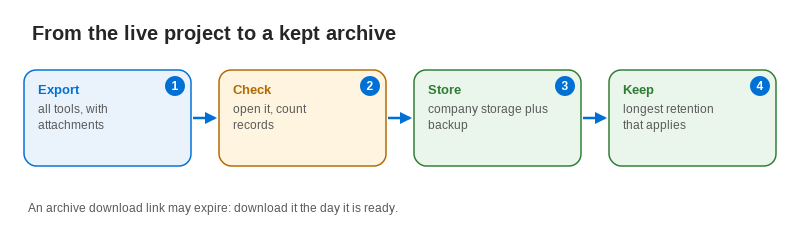
Why it matters on public works
- Labor compliance audits can come after the job is closed. See Labor compliance: audits and penalties.
- Claims, warranty issues and agency audits can arise years later.
- Contracts and the law set record retention periods; follow the longest that applies.
What to export
- Daily logs (with photos).
- RFIs and submittals with all responses and attachments.
- Change events and change orders.
- Drawings: the final current set and the revision history.
- Meeting minutes and correspondence.
- Inspections, observations and punch list.
- Financial records: budget, commitments, invoices (also in your accounting system).
How
According to Procore's help pages, the project archive tool (renamed from Data Extracts 2.0) exports data from several tools into an organized download, most items as PDF and files in their original format; an archive is available to download for 30 days after it's created. An older Windows application, Procore Extracts, also exports a project's data to folders on a computer. Check which one your account has.
Storing it
- Company storage you control, with a backup.
- A consistent folder name: contract number, route, year.
- A short index of what's inside and when it was exported.
Before you sign or renew
Ask how you export your data and what happens to it if you leave. See Questions to ask before signing.
In Procore's own help
Project Archive · Download a project archive · Procore Extracts (Windows). Procore's help pages are the reference for how each screen works today.
Common mistakes
- Assuming the data stays available after the subscription ends.
- Exporting without attachments.
- Archives saved on one person's laptop.