
Timesheets, crew hours and certified payroll
In one sentence: Timesheets captures who worked, how long and on what, from the field every day; certified payroll is still produced by your payroll system or a certified payroll tool from those hours.
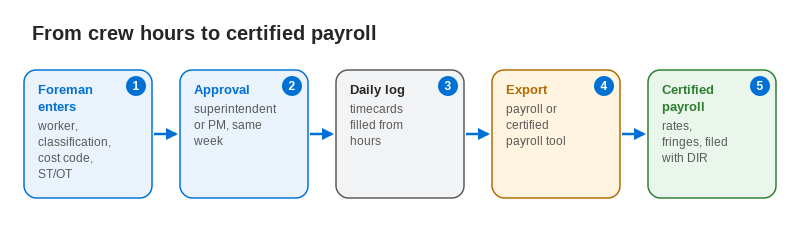
What the Timesheets tool does
According to Procore's documentation, the Timesheets tool lets the field enter time for individuals or whole crews on mobile and web, against cost codes, with approvals, and export it to payroll or an ERP. Workers come from the company directory and the Crews tool. Hours can also fill the Daily Log's Timecards section.
Setting it up for public works
- Classifications: make sure each entry carries the worker's prevailing wage classification for the work done (for example inside wireman, laborer, operator), not just their name. On public works the rate depends on the work performed. See Prevailing wage.
- Split days: a worker who pulls wire in the morning and trenches in the afternoon needs two lines.
- Straight time and overtime recorded separately.
- Cost codes matching bid items, so labor cost by item is real.
Certified payroll
Procore Timesheets is time capture, not a certified payroll system. California certified payroll still has to be produced with the right rates and fringes and filed electronically with DIR. Options:
- export hours to your payroll provider and produce certified payroll there;
- use a certified payroll or labor compliance application connected to Procore (several are listed in Procore's App Marketplace).
See Certified payroll and Integrations an electrical GC asks about.
Approvals
The foreman enters, the superintendent or PM approves, payroll exports. Hours approved the same week are far more accurate than hours rebuilt at month end.
In Procore's own help
Timesheets. Procore's help pages are the reference for how each screen works today.
Common mistakes
- One classification per worker for the whole week.
- Overtime hidden in a single daily total.
- Assuming the export from Procore is already a certified payroll report.