
Building the closeout package as you go
In one sentence: almost everything in a closeout package already passes through Procore during the job, so file it in a closeout folder as it arrives and the package is nearly done at substantial completion.
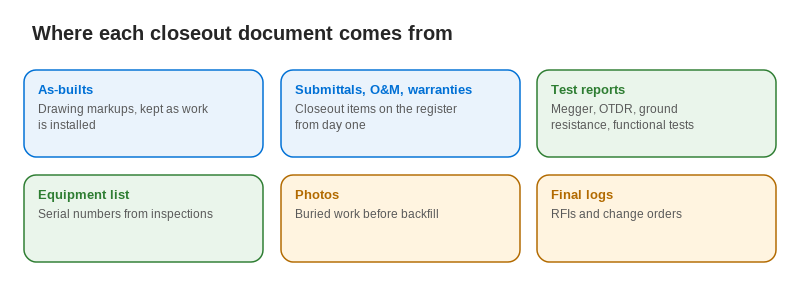
What goes in an electrical closeout package
| Document | Where it comes from in Procore |
|---|---|
| As-built drawings | Drawings markups and revisions |
| Approved submittals | Submittals tool |
| Test reports (megger, OTDR, ground resistance, functional tests) | Inspections, Documents |
| O&M manuals and warranties | Submittals (closeout items) or Documents |
| Equipment list with serial numbers | Inspections or a register in Documents |
| Certificates of compliance | Submittals or Documents |
| Photos of buried work | Photos |
| Final RFI and change logs | RFIs, Change Orders |
See Closeout package checklist for what Caltrans expects.
Setting it up
- Add closeout submittals to the register from day one (O&M manuals, warranties, as-builts), each with its spec reference.
- Create a Closeout folder structure in Documents that mirrors the package.
- Keep red-line as-builts on the drawings as work is installed, not from memory at the end.
Exporting
When the job ends, export the package: Procore's project archive tool (formerly Data Extracts) can export organized records and documents from tools like Submittals, Drawings, RFIs, Daily Log and Documents, with filters and attachments. See Keeping your records after the job.
PM notes
Make closeout documents a condition of a sub's retention release. They're easiest to get while the sub still wants to be paid.
In Procore's own help
Project Archive. Procore's help pages are the reference for how each screen works today.
Common mistakes
- Collecting O&M manuals and warranties after the job ends.
- As-builts drawn from memory.
- Test reports kept in personal email.