
Change events and change orders
In one sentence: a change event records anything that may change scope or cost, before it becomes a change order, so every possible change is tracked, priced and either approved or dropped.
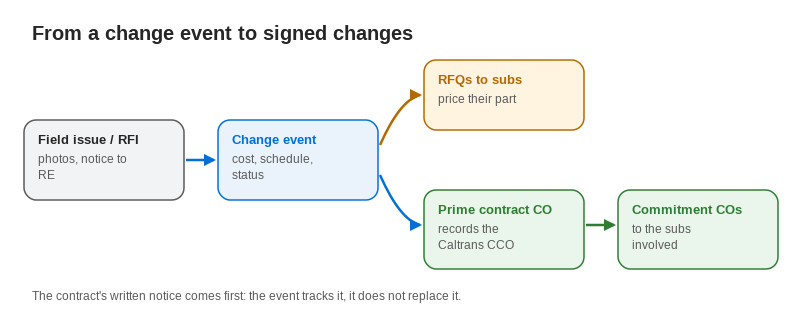
The pieces
- Change event: the record of a possible change: what happened, why, the estimated cost and schedule impact. It can start from an RFI, an observation or a field note.
- RFQ (request for quote): sent from the change event to a sub or supplier to price their part.
- Prime contract change order: the change with the owner (for you, Caltrans).
- Commitment change order: the change with a sub or supplier, on their subcontract or purchase order.
- Potential change order (PCO): in the two- and three-tier setups, a step before the change order is final.
Procore lets a company choose one, two or three tiers for its change order workflow; fewer tiers means fewer steps between the event and the signed change.
On a Caltrans job
Caltrans issues Contract Change Orders, and the Standard Specifications set strict notice rules: give written notice when you believe something is extra work, and follow the protest steps if the RE disagrees. Procore helps you track and price; it doesn't replace the contract's notices. See Change orders and potholing findings and Claims and disputes on public contracts.
A practical flow:
- Field finds a conflict → RFI and photos.
- Answer changes the work → change event the same day, with a note of when you gave the RE written notice.
- Track costs on that event (labor, equipment, material) or price it with RFQs.
- Caltrans issues the CCO → record it as a prime contract change order linked to the event.
- Issue commitment change orders to the subs involved.
Reporting
The change events log shows open exposure by status: what's pending, priced, approved, rejected. Review it with the budget every month. See Budget, commitments and subcontracts.
In Procore's own help
Change Events. Procore's help pages are the reference for how each screen works today.
Common mistakes
- Waiting for the CCO before creating the change event.
- Tracking costs of extra work in the base cost codes.
- Approving a commitment change order before the prime change order is agreed, without noting the risk.