
What Procore is and who it is for
In one sentence: Procore is a cloud platform where the owner, the general contractor and the subs keep a project's documents, communication and money in one place, used from a browser in the office and an app in the field.
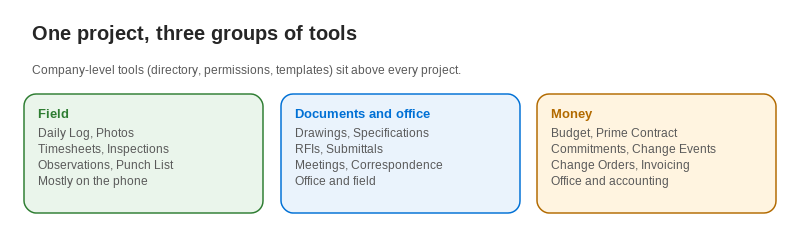
How it is organized
Procore is organized as tools: each one handles one kind of record. There are company-level tools (the company directory, permissions, templates, company reports) and project-level tools (everything about one job). A company turns on the project tools it uses.
The tools an electrical GC meets first
| Where | Tools | What they replace |
|---|---|---|
| Field | Daily Log, Photos, Timesheets, Inspections, Observations, Punch List | Paper dailies, phone photos, timecards, checklists |
| Documents | Drawings, Specifications, Documents | Plan sets on a shared drive, the spec book PDF |
| Office | RFIs, Submittals, Correspondence, Meetings, Schedule | Email chains and spreadsheets logs |
| Money | Budget, Prime Contracts, Commitments, Change Events, Change Orders, Invoicing | Excel budgets, change order logs, pay applications |
Who logs in
- Your office: the PM, project engineer and accounting.
- Your field: foremen and superintendents, mostly from the phone app.
- Collaborators: subcontractors, suppliers, and sometimes the agency and its engineer. Collaborators usually see only what you share with them.
On Caltrans jobs the Resident Engineer works in Caltrans' own systems and forms, so Procore is mainly your system of record: you produce from it the RFIs, submittals, daily reports and change documents Caltrans asks for. See What a Caltrans electrical contractor does.
What this guide is
A practical, independent guide written from Procore's public documentation and from how a Caltrans electrical job runs. Procore changes often: when a screen looks different from what is described here, Procore's own help pages win.
In Procore's own help
Procore Support. Procore's help pages are the reference for how each screen works today.
Common mistakes
- Turning on every tool on day one and overwhelming the crew.
- Expecting the agency to work inside your Procore project.
- Copying a large GC's setup without trimming it for a small company.