
The Daily Log and Caltrans daily reports
In one sentence: the Daily Log is one shared log per day that the crew fills section by section, and set up right, it gives you everything a Caltrans daily report needs.
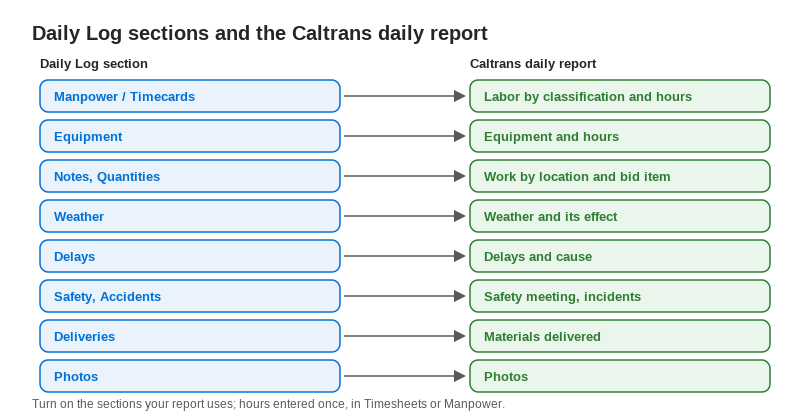
The sections
The Daily Log is organized in sections, many on by default: weather, manpower, notes, timecards, equipment, visitors, phone calls, inspections, deliveries, safety violations, accidents, quantities, productivity, scheduled work, photos, and delays among others. Weather can be filled automatically for the project's location. Admins choose which sections show and in what order.
Mapping to a Caltrans daily report
| What the RE needs | Daily Log section |
|---|---|
| Labor by classification and hours | Manpower (or Timecards, fed from Timesheets) |
| Equipment on site and hours | Equipment |
| Work performed, by location and bid item | Notes, Quantities |
| Weather and its effect | Weather / Observed weather conditions |
| Delays and their cause | Delays |
| Safety meeting, incidents | Safety violations, Accidents, Notes |
| Materials delivered | Deliveries |
| Photos | Photos |
| Visitors, inspectors | Visitors, Inspections |
See Daily reports and documentation for what a good Caltrans daily report contains.
One entry, not two
- If the crew enters hours in Timesheets, Procore can fill the Daily Log's Timecards from them, instead of typing hours twice.
- Agree on one output for the RE: a PDF report from Procore, or your own form filled from it. Don't keep a paper daily alongside.
Good daily log habits
- Write delays the day they happen, with the cause and who was told.
- Name locations the way the plans do (station, pole number, pull box number).
- Attach photos to the entry they explain.
- The superintendent or PM reviews and completes the day.
PM notes
The daily log is your evidence in every change and claim. Write it as if a stranger will read it a year from now. See Claims and disputes on public contracts.
In Procore's own help
Daily Log overview. Procore's help pages are the reference for how each screen works today.
Common mistakes
- Turning on every section, so the crew skips most of them.
- Hours typed in the log and again in Timesheets, with different numbers.
- "Worked on site" as the only note.