
Drawings and specifications in Procore
In one sentence: the Drawings tool keeps one current set with every revision behind it, and the Specifications tool splits a spec book into sections, so the crew opens the right sheet and the right section from the phone.
Drawings
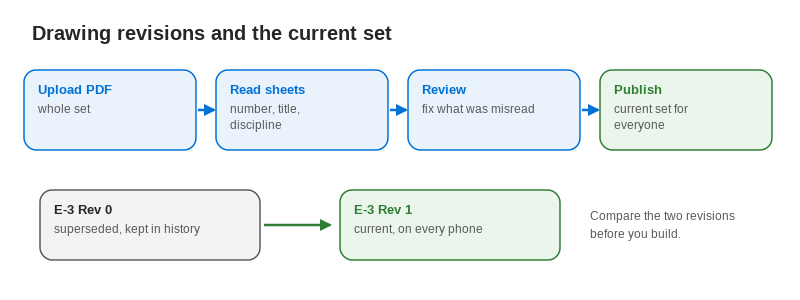
- Upload the plan set as PDF. Procore's OCR reads each sheet's number, title and discipline and splits the set into sheets; you review and correct before publishing.
- When an addendum or a revision arrives, upload it as a revision: the new sheet becomes current and the old one stays in the history.
- Drawing areas separate sheets that share numbers (for example two interchanges in one contract).
- Markups and links: draw on a sheet, pin an RFI, a photo or a punch item to a location.
- Compare two revisions to see what changed before you build.
Caltrans electrical sheets (E-sheets, standard plans references, pole and conduit schedules) read well when the PDF is clean and vector-based; scanned sets need more manual correction.
Specifications
- Upload the spec book as one PDF. Procore uses the text to split it into sections, which you review and publish.
- Procore groups sections into divisions by matching the first digits of the section number to standard construction codes. Caltrans Standard Specifications and Special Provisions are numbered by Caltrans section (for example Section 86, Electrical Systems), not by the usual building divisions, so expect to check and fix the grouping by hand the first time.
- When a revised section is uploaded, Procore keeps it as a revision.
In the field
The app shows the current set and can keep viewed sheets for offline use. See Bringing your field crew on board.
PM notes
Make "publish the revision" part of the same day you receive an addendum. A revision sitting in an email is the most common reason work gets built to an old sheet.
In Procore's own help
Drawings · Specifications · Review and publish specifications. Procore's help pages are the reference for how each screen works today.
Common mistakes
- Publishing OCR results without checking sheet numbers.
- Leaving superseded sheets downloaded on phones without the new revision.
- Expecting Caltrans section numbers to sort themselves into the right divisions.